
Ticket intake
Every client’s tickets arrive in one Service Desk, so your team works from one queue instead of a separate tool per job.
SERVICE DESK · PSA
Service Desk is where your team works tickets in Command: intake, technician workflow, team todos, a shared calendar, and a knowledge base. SOC work sits on the same board as service work, and projects, change requests, and procurement sit beside it as related work.
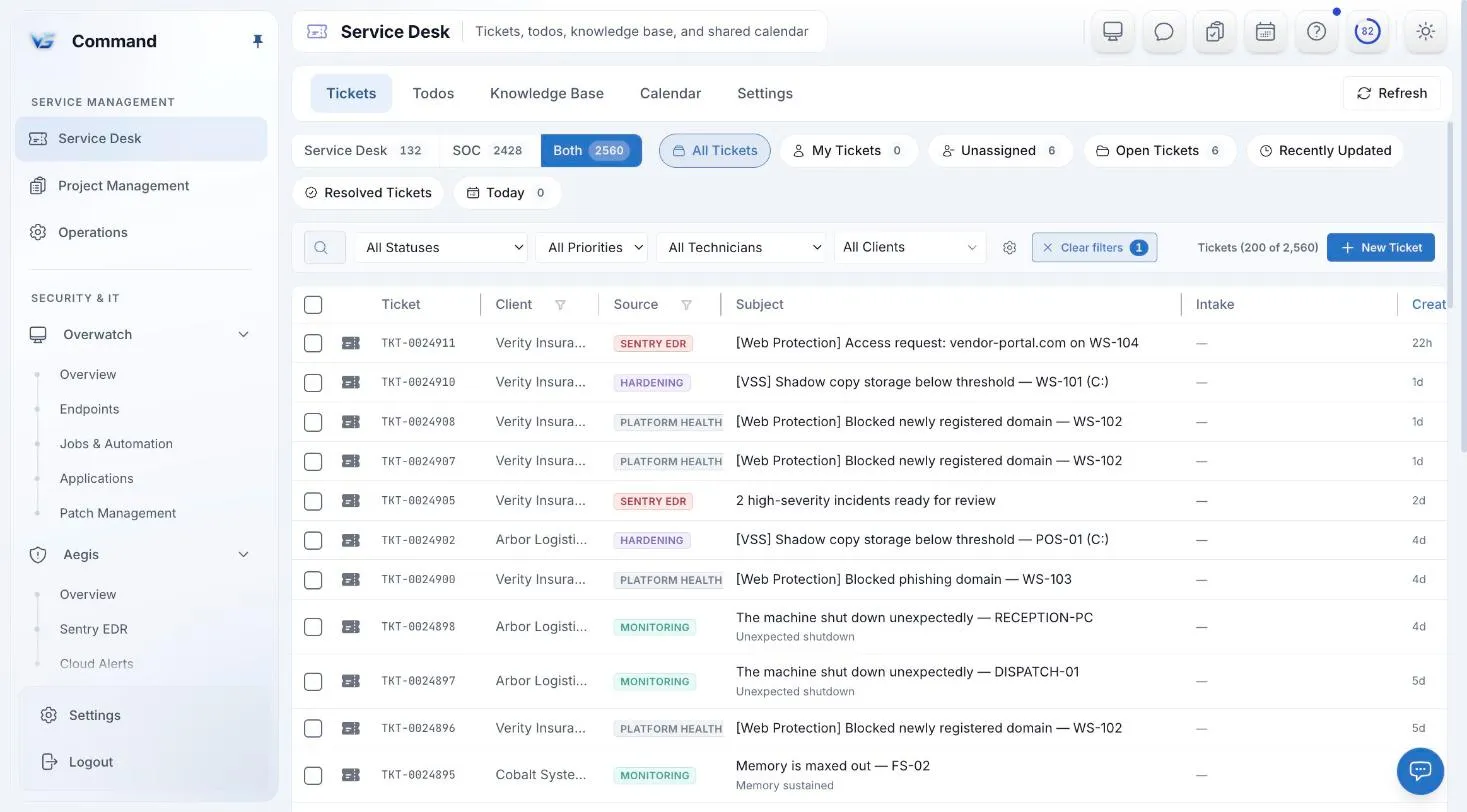
Command screenshot with sample data. Names are fictional.
TICKETING
Tickets for every client come into one Service Desk, in the same console as your endpoints, security tools, and documentation. Technicians work them through to resolution without switching products.
Every client’s tickets arrive in one Service Desk, so your team works from one queue instead of a separate tool per job.
Technicians work each ticket to resolution in Service Desk, and can search the knowledge base from the ticket panel while they work.
From Response Ops, a technician can turn a security incident into a ticket, so it is tracked like any other client work.
ONE BOARD
A lane switch on the ticket board moves between Service Desk work and SOC work. Security tickets get the same workflow and history as everything else, instead of living in a separate product.
Switch the board between service work and SOC work. Both lanes use the same tickets, the same technicians, and the same workflow.
When security work is tracked as tickets on the same board, it is planned, assigned, and reviewed like the rest of the work.
TEAM TOOLS
Not every task is a ticket. Service Desk includes the team tools that keep service delivery organized.
Track the follow-ups and internal tasks that do not belong in a client ticket.
One calendar for the team, in the same console as the tickets.
Write down the fix once. Technicians can search the knowledge base from the ticket panel.
RELATED WORK
A migration or a firewall change is not a long ticket thread, and a hardware order is not a todo. Command tracks each as its own kind of work, next to the service desk.
Plan and run MSP projects as projects, with their work tracked separately from the ticket queue.
Change requests have their own records, so a planned change is tracked as a change, not buried in a ticket.
Operations tracks procurement and orders with the vendor, tracking number, and carrier, scoped to the client they are for, with downloads and reports alongside.
ONE CONSOLE
Monitoring, patching, jobs and automation, and remote control, under policies at every scope.
Every incident in one place, and playbooks whose riskier steps pause for a person.
Knowledge base, assets, and contacts, with credentials in a separately permissioned vault.
Users, groups, conditional access, and mailboxes for every client tenant.
Service delivery, endpoints, security, Microsoft 365, and documentation in one console.
INCLUDED IN THE ONE PRICE
One price covers every Command module, including Sentry EDR and Web Protection. Unlimited technicians, month-to-month, and a free 30-day pilot on up to 50 endpoints.
FAQ
Service Desk covers ticketing and service delivery: intake, technician workflow, todos, a shared calendar, and a knowledge base, with projects, change requests, and procurement alongside. Command does not have a staff billing module yet. Clients can see their invoices, read live from QuickBooks, in the client portal.
Yes. The ticket board has a lane switch for Service Desk and SOC work, so security tickets follow the same workflow as everything else.
No. Projects and change requests are kept separate from tickets. Change requests have their own records.
Yes. Operations tracks procurement and orders with the vendor, tracking number, and carrier, and can scope each order to a client.
Yes. It is part of the one Command price of $6 per endpoint per month, with every other module, unlimited technicians, and no long-term contract.
Book a demo for a guided tour, or apply for the beta to run Command free for 30 days with guided onboarding.